Simulation and synthetic data: demonstrations without an operator and the gap with the real world
Robot recordings cost hours of operators' work, and the human video from lesson 4.4 contains no robot actions. A third source is the physics simulator: in it, a robot can try a task thousands of times in parallel, and the position of every object is known exactly. In 2018, OpenAI got about two years of simulated hand experience per hour of compute, and in 2025, NVIDIA generated 780,000 trajectories for GR00T N1 in 11 hours; operators would have needed nine months of nonstop work to collect that many recordings. The price is the gap with reality: the simulator has different light, different colors and different friction, and a model that never misses in the simulator makes mistakes on a real table. We'll look at what simulators compute well and what they compute poorly, how randomization turns the real world into one more variant of the simulator, how MimicGen turns ten operator recordings into a thousand, and where synthetic data already works in 2026.
Data for compute time instead of people's time
The first four lessons of this part have shown what data costs. In lesson 4.2, every hour of demonstrations cost an hour of an operator's work with a leader arm or a VR headset; in lesson 4.3, 50 people spent 12 months collecting DROID; and the human video from lesson 4.4 is cheap but contains no robot actions. There is a source where the actions are known exactly and no operator time is needed: a physics simulator.
A physics simulator is a program that takes a description of the robot and the objects and computes, step by step, how they move: what forces act in the joints, where the objects touch each other, what falls and what shifts. The part that computes the mechanics is called the physics engine, and the part that draws the camera image is called the renderer. In a simulator, the position of every object is known without sensors, a program checks whether an attempt succeeded, and thousands of copies of the robot run in parallel on GPUs. This is how OpenAI got about two years of hand experience per hour in 2018, and NVIDIA generated 780,000 trajectories for GR00T N1 in 11 hours; by NVIDIA's count, that equals 6,500 hours, or nine months of continuous operator work.
The trouble is that the world of the simulator differs from the real one. This mismatch is called the sim-to-real gap. We already met it in lesson 0.2: the actuator in the simulator is ideal, while a real one has friction, backlash and delays, and Hwangbo et al. closed this gap with a small neural network trained on recordings of the actuator. But the actuator is only one part of the gap. Light, colors, glare, the friction of fingers against an object, the softness of fabric: the simulator reproduces all of these with errors, and a model that never misses in the simulator can make mistakes noticeably more often on a real robot.
To understand what to do about it, let's first look at which simulators exist and what they compute well and what poorly.
What a simulator gets right and what it gets wrong
There are many simulators for robots, and three come up most often in the papers of this part. MuJoCo (Multi-Joint dynamics with Contact) is an engine by Emanuel Todorov et al., described in 2012. It was built for optimizing movement through contacts, and it computes quickly and stably. Contact in MuJoCo is soft: objects penetrate each other slightly, and the force grows with the penetration depth. This makes the contact problem reliably solvable, but, as the documentation says, slow slip in a contact can't be fully suppressed. DeepMind bought MuJoCo in 2021 and open-sourced it in 2022. The Dactyl hand, which we'll discuss below, was trained in it, and a MuJoCo model of the robot is released together with ALOHA 2 from lesson 1.7.
NVIDIA's Isaac Sim and Isaac Lab, which runs on top of it (formerly ORBIT, 2023), are designed around the GPU. PhysX 5 computes the physics, including deformable bodies with the finite element method, and the image is drawn by a ray-tracing renderer that reproduces transparency and reflections. The ORBIT authors got 50,000–75,000 frames per second with 2,048 parallel environments in reinforcement learning, and the task suite includes cloth folding. Genesis started in December 2024 as an academic project that combines different solvers in one program: for rigid bodies, the finite element method, and particles for liquids and sand. Since May 2026, the company Genesis AI has been developing it under the name Genesis World 1.0.
You can see what works well and what doesn't from the tasks that paper authors call hard. Rigid bodies, joints and walking simulate well: humanoid walking is often trained entirely in simulation, like the legs of HOMIE from lesson 4.2; more on this in the “Today” section. Contact with many fingers, where fractions of a millimeter and friction decide the outcome, is harder: the Dactyl hand never learned to rotate a sphere, and the authors suggest the reason may be that they didn't randomize the parameters related to rolling. Soft and liquid materials are harder still: the DreamGen authors explicitly name folding towels and wiping liquids as tasks that are difficult to simulate. The image is a separate problem: light, shadows, glare and colors in the renderer differ from what the robot's camera sees.
The gap can be closed from two sides. You can make the simulator more accurate: measure the masses and friction of the real robot and put them into the model; this is called system identification. But you can't measure everything: Tobin et al. list nonrigidity, gear backlash and wear-and-tear, which simulators don't model at all. Or you can come from the other side and train the model so that it doesn't care what exactly the light, the colors and the friction in the world are. How?
Randomization: the real world as one more variant of the simulator
If you can't make the simulator look like the real world, you can make it varied. Tobin et al. (2017) proposed domain randomization: in every training scene, the properties of the world that the simulator reproduces poorly change at random, so that, in the authors' words, “the real world may appear to the model as just another variation.”
Their task was simple: from a single camera frame, find an object on the table (a cube, a cone or a cylinder) and output its coordinates. In every scene, they varied the textures of the table, the floor, the background and the robot, the textures of the objects themselves, the number and shape of distractors on the table (from 0 to 10), the number of lamps, their position and specularity, the camera position within a 10 × 5 × 10 cm box and its rotation by up to 0.1 radians. The textures are deliberately unrealistic: a random color, a gradient between two colors or a checker pattern. The images were drawn by MuJoCo's built-in renderer, which, as the authors write, “is not intended to be photo-realistic.” The model didn't know the color of the target object: it was random too, so the object could be found only by its shape and size.
A detector trained only on such images was off by 1.5 cm on average on real photos, and a Fetch robot, using its coordinates, grasped the object in 38 attempts out of 40, including among distractors. The details of the ablations matter. With fewer than 1,000 different textures, accuracy drops noticeably. Without distractors in training, the model was off by 7.2 cm instead of 1.8 on a real table with distractors. ImageNet pre-training, on the other hand, which the authors had expected to be essential, turned out to be unnecessary with a large number of images. One more detail: in the simulator, the error was 0.3–0.5 cm, so the gap narrowed but didn't disappear.
One question remains, and the paper settles it by hand: how widely should the world vary? Tobin et al. randomized the object's color completely because their task didn't depend on color. But what if the task itself depends on color, for example, if you have to pick up specifically the red cube? Let's test this on the table with the objects from lesson 2.1.
Randomizing by eye: how much to vary the simulator
Ada is a home humanoid on a wheeled base; the course labs are built around her. More about her in lesson 0.1.
Ada needs to pick up the red cube. The table also holds a cube of another color and two bowls or cans, which aren't red either. The camera on Ada's head looks down at the table, and the model is built like the “where to pick” map from lesson 4.3: for each of the 576 cells of the table, it looks at a 12 × 12 pixel window around the cell and outputs a score, and then it turns the scores into probabilities. Ada picks a cell according to these probabilities, and we call success the share of attempts in which the gripper hits the red cube.
The model learns only in the simulator. There, the table is made of smooth gray plastic, the light is even and bright, the colors are exact, there are no shadows or noise, and the simulator itself knows where the cube lies, so no operator is needed. The model is tested on Ada's real table, which isn't in the training data: it has an oak tabletop, it's evening, a warm lamp shines from the left, there are shadows, and the real red cube is darker than in the simulator. The sliders set the randomization width from 0 (as is) to 4 (widest). The tablecloth slider changes the color and pattern of the table, the light slider changes its brightness and tint, and the paint slider changes the hue, saturation and brightness of each object.
Top-down view of the table; the table measures 96 × 96 pixels, about 48 cm. On the left are the four scenes the model learns from; the simulator drew them at the selected randomization width. On the right is a test scene on Ada's table: the table is dimmed, the orange fill shows the probability with which Ada closes the gripper in that cell, and the red cube is circled with a green ring.
Legend: marks on the scene and the chart
Under the hood: how the simulator and Ada's table are drawn, the model and the spread across seeds
The simulator. The objects are the same as in lessons 2.1 and 4.3: a cube, a bowl and a can in six colors, with a radius of about 5.6 pixels. The table in the simulator is gray, with no pattern. At levels 1–4, randomization works like this: the table color shifts randomly in each channel by up to ±0.14, ±0.31, ±0.5 and ±0.7 (at level 4, it can be almost any color), and from level 2 on, with a probability of 0.3–0.6, the table becomes striped or checkered; the light multiplies each channel by , where the brightness is , , and the tint is ; the paint of each object shifts in hue by up to ±5°, ±10°, ±20° or by any angle at level 4, and in saturation and brightness by up to ±10, 20, 30 and 40%.
Ada's table. The tabletop is oak, with grain. The light of a dim warm lamp multiplies the red, green and blue channels by 0.85, 0.58 and 0.36; the left side is brighter, and the right side is 30% darker. The objects cast soft shadows, each object has a lit side and a shaded side, and the camera adds noise. The paint is different too: the red cube's color is instead of in the simulator, while the paint of the other objects is almost the same.
The model and training. The features of a cell are the mean colors of the cell itself and its eight neighbors, 27 numbers in total. A network with 16 ReLU neurons scores each cell, a softmax over the 576 cells turns the scores into probabilities, and the network learns by cross-entropy on the cell where the cube lies. For every slider setting, the 96 simulator scenes have the same object placements, and only the way the simulator draws them changes; training takes 300 Adam steps with batches of 8 scenes. The test uses 48 scenes: the same placements are shown once in the simulator without randomization and once on Ada's table.
Spread. The numbers in the missions are computed for one set of seeds. On three other sets, the model on Ada's table scored 4, 51 and 58% without randomization, 86, 95 and 90% with the tablecloth and the light at level 3 and the paint at level 1, and 26, 22 and 6% with the paint at level 4. The tablecloth and the light at level 4 gave sometimes more and sometimes less than at level 3: that's where the gain runs out.
Randomization helps when it varies what the model should be indifferent to, and when it does so in a way that puts the real world close to the training variants. The tablecloth and the light can vary widely: the task doesn't depend on them. The paint can vary only narrowly: red is exactly what Ada uses to find her cube among the other objects. There's no point randomizing beyond reality: the model has to learn from worlds that don't exist, and with the same amount of training, it does worse both in the simulator and on the table.
Here, only the image changed. Can you randomize the physics too: the masses, the friction, the motor delays?
Randomizing physics and its price: the hand that rotates a cube
The image is the easiest thing to randomize: repainting costs a renderer nothing. Physics is harder, and the best-known example here is OpenAI's 2018 work, known as Dactyl after the name of its system. A Shadow Dexterous Hand with 24 degrees of freedom and 20 pairs of tendons has to turn a cube in its palm until the right face is on top and then move on to the next goal. It was trained with reinforcement learning, as in lesson 1.2, entirely in the MuJoCo simulator and without a single human demonstration: the hand tries on its own and learns from a reward. Training ran on 384 machines with 16 cores each, which gave about two years of hand experience per hour. As input, the policy gets the positions of the fingertips and the cube. On the real hand, the fingertips are tracked by a motion capture system: cameras around the hand follow LED markers on the fingers. The cube position comes from the same kind of markers on the cube or from three ordinary cameras through a separate network.
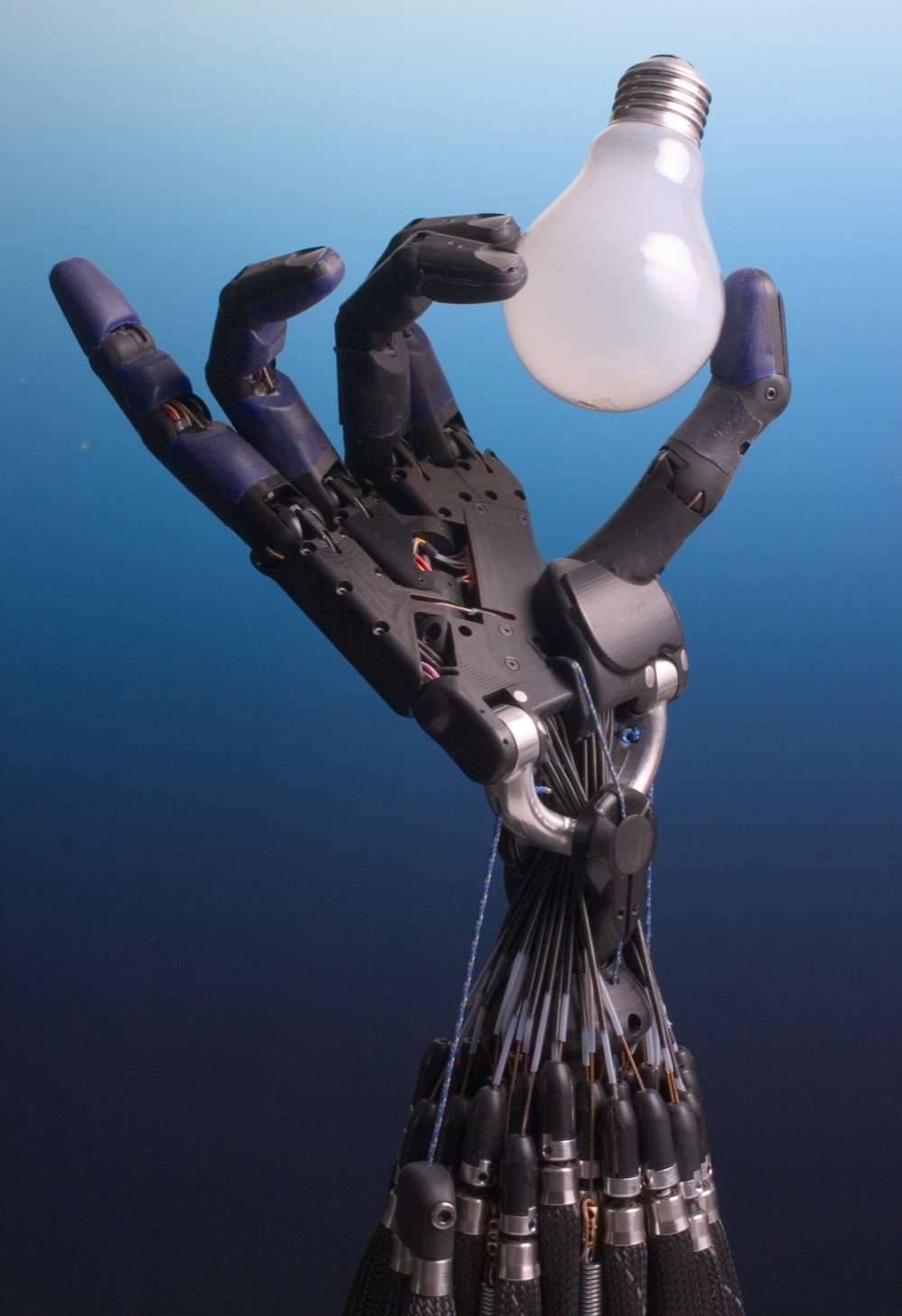
Three groups of properties were randomized. The physics was changed at the start of every episode: the masses of the links and the cube by a factor of 0.5–1.5, friction by 0.7–1.3, joint damping by 0.3–3, and also the actuator gains, the cube size, the joint limits and even the direction of gravity; many of the ranges are centered on values measured during calibration of the real hand. Unmodeled effects are things MuJoCo doesn't have at all, so they were added to the simulation: tendon backlash, an 80 ms action delay on half of the actuators, noise in the commands, dropped motion capture markers and random pushes on the cube. Observation noise added errors to the positions of the fingertips and the cube. Separately, the image was randomized for the network that finds the cube position from three cameras: materials, colors, lighting, and camera positions within 1.5 mm of the calibrated ones.
The measure was the number of turns in a row before the cube fell; an attempt was stopped at 50. In the simulator, the median was 50, and on the real hand, 13. Without randomization, training went much faster: about 3 years of hand experience instead of 100, an hour and a half instead of 50 hours. But which of these randomizations does the real hand actually need? The authors trained five policies, each with a different set of randomizations held out, and tested each one on the real hand 10 times.
Which randomizations keep the hand from dropping the cube
Below, Table 4 of the Dactyl paper is drawn as dots: each dot is one attempt on the real hand, and the horizontal axis shows how many turns in a row the hand made before it dropped the cube. Choose which group of randomizations to remove in training and where the policy gets the cube position from: from the motion capture markers or from three cameras through a network trained on simulator images. Hover over a dot to read its number.
The horizontal axis shows the number of turns in a row in one attempt, from 0 to 50 (attempts were stopped at 50). Each row shows one policy: the 10 dots are 10 attempts on the real hand, and the vertical bar marks the median. The selected policy is highlighted; the rows that aren't revealed yet are gray. The numbers come from Tables 3 and 4 of the OpenAI paper.
Randomizing the physics and the unmodeled effects turned out to matter most: without either of them, the median falls from 13 to 2. Observation noise is barely needed with markers because the markers are accurate, but when a network estimates the cube position from the cameras, the median without it falls from 11.5 to 3.5. It pays to randomize what differs most between the simulator and reality, and roughly within the limits of that difference. And even with all the randomizations, the gap remained: 13 turns versus 50 in the simulator.
Dactyl learned without demonstrations, through reinforcement learning. But in this part of the course, we're interested in demonstrations: can you get those from a simulator too, not one at a time from an operator but by the thousands?
MimicGen: a thousand demonstrations from ten
Reinforcement learning, as with Dactyl, needs a reward and years of experience for every task, and for long tasks like assembly or making coffee, it is hard to set up. Demonstrations are simpler, but an operator has to record them. Mandlekar et al. (NVIDIA, 2023) noticed that large datasets contain many repeats: an operator grasps a mug with almost the same movement wherever it stands. So instead of recording again, you can transfer a recording: if the mug moved by 20 cm, shift the arm's movement by 20 cm too.
This is how MimicGen works. The task is split into subtasks, each tied to one object: “pick up the cube” is tied to the cube, and “put it in the bowl” to the bowl. The source demonstrations are cut into segments by subtask. For a new placement, the generator takes a segment of a random source demonstration and transfers it so that the gripper pose relative to the object stays the same at every step. Before the segment, it inserts a straight-line move from where the gripper is now to the start of the transferred segment; in the simulator, this takes 5 steps. The robot executes the resulting trajectory in the simulator, and the generator keeps it only if the task was completed. The ratio of successful attempts to all attempts is called the data generation rate.
From about 200 human demonstrations, the authors generated more than 50,000 for 18 tasks. For each task, they took 10 source recordings in a narrow zone of the table and generated 1,000 from them. The success rate of image-based policies rose from 11.3% to 90.7% in the Square task, where a nut has to go onto a peg, from 19.3% to 98.0% in the Threading task with a needle, and from 1.3% to 82.0% in Three Piece Assembly. In wide zones, where the objects can stand anywhere and some of them never moved in the source recordings, success ranged from 42 to 99%. In most tasks, 200 generated demonstrations gave as much as 200 recorded by people. From 200 to 1,000, success grew noticeably, and from 1,000 to 5,000, it barely changed.
On a real arm, the scheme is the same, except that the generated trajectories have to be executed in the real world. Generation from 10 source recordings succeeded in 82.3% of cases in the “stack a cube on a cube” task and in 52.1% in the coffee machine task. The policy trained on the generated data succeeded in 36% and 14% of attempts, and the policy trained on the 10 source recordings never did. The authors name the limitations themselves: you need to know the subtasks and the object poses; a straight-line move doesn't guarantee that the arm won't hit anything; only tasks with rigid objects and without fast dynamics are covered; and since the filter looks only at success, the dataset can end up biased.
Let's see what such a transfer gives on Ada's table and why the generator needs the check in the simulator.
Generating demonstrations: ten operator recordings and three hundred from the simulator
The task is to put the cube in the bowl. The operator recorded 10 demonstrations, and the whole time the cube lay in one part of the table and the bowl in another, each within a 6 cm square. The operator moved the gripper in an arc and approached the cube from the lower left. The test uses 60 new placements where the cube and the bowl can lie anywhere in the workspace. The model sees the coordinates of the gripper, the cube and the bowl and outputs where to move the gripper and whether to close it; this is how the state-based (“low-dim”) policies of the MimicGen paper work. Ada's arm travels at most 1.4 cm per step.
The left model learns from the operator's 10 recordings. The right one learns from the same recordings plus 300 demonstrations that the generator made from these 10 the same way MimicGen does: it cuts a recording into two segments, moves them to the cube and to the bowl, inserts a 5-step straight-line move, executes the trajectory in the simulator and checks whether the cube landed in the bowl.
Top-down view of the table; the table measures 48 × 48 cm, and Ada stands at the bottom edge. The red square is the cube, the dark ring is the bowl, and the circle at the bottom edge marks where the gripper starts. The dashed frames show where the cube and the bowl lay when the operator recorded the demonstrations. Thin lines show the gripper paths in the model's data: orange for the operator recordings and purple for the generated ones (30 of them are shown). The thick blue line shows the model's gripper path in this placement; a check mark at its end means the cube is in the bowl, and a cross means the model failed.
Legend: marks on the scene
Under the hood: the generator, the policy and the spread across seeds
Operator recordings. The gripper starts at a point near the bottom edge of the table. The operator moves it in an arc (a Bézier curve) to a point to the lower left of the cube, brings it to the cube in 4 steps and closes the gripper, then carries the cube in an arc over the table to the bowl and opens the gripper above it. The height of the arcs and the speed vary from recording to recording, and the hand trembles by about 1 mm.
The generator. Segment 1 runs from the start to grasping the cube, and segment 2 from the grasp to the release. For a new placement, the generator takes a random recording, shifts segment 1 by the cube's offset and segment 2 by the bowl's offset, and inserts a 5-step straight-line move before each segment. In MimicGen, the transfer is a full pose transformation ; on a flat table without rotations, it reduces to a shift. The arm chases the target at no more than 1.4 cm per step; if the move is long, the arm lags behind and closes the gripper before it reaches the cube. An attempt succeeds if the gripper closed no farther than 2.5 cm from the center of the cube and opened no farther than 3.75 cm from the center of the bowl.
The policy. The policy gets 7 numbers as input: the coordinates of the gripper, the cube and the bowl and a flag for whether the gripper is closed. A 7 → 48 → 48 → 3 network with tanh outputs the gripper shift and the “close” command. The loss is the sum of the mean squared error on the shift and the cross-entropy on the command; the steps where the command changes weigh 8 times more because an episode has only two of them. All models are trained the same way: 5,000 Adam steps with batches of 32 examples. We test on 60 placements and give each one up to 90 steps.
Spread. We repeated the experiment with three policy seeds. On new placements, the model on 10 recordings succeeded in 0–3% of cases, the model with 300 generated demonstrations in 62–72%, and the one with the same attempts but without the check in 45–58%. With the same 5,000 training steps, a model with 1,000 generated demonstrations is no better than one with 300: there is more data, but fewer passes over it.
The generator doesn't invent new movements: every generated demonstration consists of segments of operator recordings and straight-line moves. What's new in them are the placements. The model on 10 recordings saw the cube only in one part of the table and doesn't know where to go outside it. The model on generated data saw the cube and the bowl all over the table. And the check in the simulator does the same job as data curation in lesson 4.3: it keeps the model from learning from attempts where the gripper closed away from the cube.
Generating more than trajectories: hands, kitchens and video
MimicGen multiplies movements in a ready-made scene. Later work by the same group expands what gets generated. DexMimicGen (2024) carries the idea over to two-armed robots with multi-fingered hands, including humanoids, where teleoperation is especially hard. Its subtasks come in three kinds: the arms work independently, hold one object together or act in turn, and each kind is transferred in its own way. From 60 human demonstrations, the authors got 21,000. For a real Fourier GR1 humanoid, they built a digital twin, a copy of the workplace in the simulator where the objects are placed at the positions measured by the robot's camera. Four operator recordings were transferred into the twin, new trajectories were generated, the successful ones were executed on the real robot, and this gave 40 demonstrations. A policy trained on them sorted cans in 90% of attempts, and a policy trained on the four source recordings never did.
RoboCasa (2024) generates the scenes themselves as well. It has 120 kitchens in 12 styles and 2,509 objects in more than 150 categories; some of the objects were created by text-to-3D models, and the textures of walls and cabinets by text-to-image models. There are 100 tasks: 25 atomic ones and 75 composite ones, which were devised with the help of a large language model. On 24 atomic tasks, the authors took 50 human demonstrations each, and MimicGen made 3,000 from them for each task. Success with unfamiliar objects and kitchens rose from 28.8% on human recordings alone to 47.6% on the generated data, and it grew with their number. In a real kitchen, where a Franka robot stood on a DROID setup from lesson 4.3, co-training on 50 real demonstrations and simulator data gave 24.4% versus 13.6% on real data alone; with unfamiliar objects, it gave 9.3% versus 2.6%. The authors list the gap themselves: a different arm controller, a different control frequency, camera calibration, lighting.
Finally, data can be obtained without a physics engine at all. DreamGen (NVIDIA, 2025) fine-tunes an image-to-video model on robot recordings, asks it to show how the robot carries out a new command from a given first frame, and recovers the actions from the video, either with an inverse dynamics model, which guesses the action between two frames, or with latent actions. A GR1 humanoid, for which only a pick-and-place task in one room had been recorded, performed 22 new behaviors after training on such videos: in the familiar room, it managed the new behaviors in 43.2% of attempts, and in unfamiliar rooms in 28.5%, while without training on the videos, success was 0% almost everywhere. The video model doesn't compute physics; it reproduces what it has seen, so it also handles towels and liquids, which are hard to simulate. The price is compute: 240,000 trajectories for RoboCasa took 54 hours on 1,500 GPUs. We'll cover video world models in detail in the part of the course on world models.
The remaining question is how much of all this makes it into systems that run on real robots.
Where synthetic data works in 2025–2026
Synthetic data works most reliably for walking. In March 2025, Figure described how it trained walking for its Figure 02 humanoid. Reinforcement learning ran entirely in a GPU-accelerated simulator: thousands of robots worked in parallel, each with its own physical parameters, and years of experience accumulated in a few hours. According to the company, the policy transfers to real robots without additional tuning thanks to two things: domain randomization in simulation and kHz-rate torque feedback in the actuators, which corrects the errors of the actuator model. One and the same network controls ten robots. This is the same scheme as with Dactyl, only for the body rather than the fingers.
In manipulation, synthetic data serves as one source alongside real recordings. GR00T N1 from lesson 3.7 was trained on both simulation and generated video: DexMimicGen gave 780,000 trajectories in 11 hours, and video models turned 88 hours of teleoperation into 827 hours of video, about 10 times more. Meanwhile, π0 from lesson 3.6 was trained on recordings of real robots, and GEN-1 from lesson 4.3, according to Generalist AI, on recordings of people with wearable devices. The simulators are changing too: Isaac Lab grew out of ORBIT and got a technical report in 2025, Genesis World 1.0 came out in May 2026, and MuJoCo has been open since 2022.
So no single source gives everything: real recordings are accurate but expensive, human video is cheap but has no actions, and simulation is free but comes with a gap. How to mix them and in what proportions, we'll cover in lesson 4.6.
Eight common misconceptions
Lesson takeaways
- A simulator gives data for compute time: about two years of hand experience per hour for Dactyl, 780,000 trajectories in 11 hours for GR00T N1. The price is the gap with reality: Dactyl's median was 50 turns in the simulator and 13 on the hand, and Ada got 100% in the simulator and 68% on the real table.
- MuJoCo, Isaac Lab and Genesis compute rigid bodies, joints and walking well. They do worse with fine finger contact, fabric, liquids and the image: light, shadows, colors.
- Randomization varies, in the simulator, what the model should be indifferent to, so that the real world becomes one of the variants. Tobin et al.'s detector, trained on unrealistic textures, was off by 1.5 cm and helped grasp the object in 38 attempts out of 40. On Ada's table, the tablecloth and the light raised success from 68 to 94%, while paint randomized to any color dropped it to 37%: you can't randomize the very feature the task depends on.
- Physics is randomized the same way, around measured values. For Dactyl, without randomizing the physics or the unmodeled effects, the median falls from 13 turns to 2, and the full randomization costs about 100 years of simulated experience instead of 3.
- MimicGen transfers segments of operator recordings to new object placements, adds straight-line moves and keeps only the attempts that succeeded in the simulator. From 10 recordings, you get 1,000, and in the Square task, success rose from 11.3% to 90.7%. On Ada's table, success rose from 3% to 67%, and without the check in the simulator, only to 47%.
- Scenes with tasks and videos with actions get generated too. RoboCasa has 120 kitchens, success there rose from 28.8% to 47.6%, and in a real kitchen, co-training gave 24.4% versus 13.6%. With DreamGen, a humanoid performed 22 new behaviors. Synthetic data works best together with real data.
Open questions
How can you tell whether the randomization is enough without putting the model on the robot?
Tobin et al. stress that transfer can't be checked on real data during training: by assumption, there is none. Dactyl's ranges were chosen around the calibration, and on Ada's table we saw that too wide a range hurts. There is no single answer yet to how to choose the ranges automatically and how to predict a model's success in the real world from its behavior in the simulator.
What pays off more for fabric, liquids and fine contact: a more accurate simulator or a video model?
Isaac Lab and Genesis add the finite element method and particles to compute soft and liquid materials. DreamGen bypasses physics: the video model reproduces what it has seen, but it is expensive, and the automatic evaluator of physical realism in the videos, as the authors themselves write, can occasionally hallucinate. Which path scales better is not yet clear.
Paper guide
- Read closelySections 3 and 4: the three assumptions, the split into subtasks, transferring a segment relative to an object, the straight-line move and the success check. Sections 6.2–6.3: the comparison with an equal number of human demonstrations and the analysis of how many source recordings are needed and whether success grows with the amount of data.
- Safe to skipThe detailed descriptions of the 18 tasks and their placement variants in the appendices.
- Question to keep in mindWhy are the data generation rate and the policy success rate almost unrelated? For example, Factory Gear Assembly has an 8.2% data generation rate and a 76.0% policy success rate.
Other papers in this lesson: Domain Randomization (Tobin et al., 2017), Learning Dexterous In-Hand Manipulation (OpenAI, 2018), ORBIT (Mittal et al., 2023), DexMimicGen (Jiang et al., 2024), RoboCasa (Nasiriany et al., 2024), DreamGen (Jang et al., 2025), GR00T N1 (NVIDIA, 2025).
Resources
- MuJoCoThe documentation: how soft contact works and what follows from it
- Isaac LabNVIDIA's framework that grew out of ORBIT: parallel environments, rendering, randomization
- Genesis WorldA simulator with several solvers: rigid bodies, finite elements, particles
- MimicGenThe project page: videos of generated demonstrations, datasets, code
- RoboCasaKitchens, objects and tasks in simulation, MimicGen data
- Figure: walking trained in simulationA post from March 25, 2025: randomization and transfer without additional tuning
We now have three sources: accurate but expensive robot recordings, almost endless human video without robot actions, and simulation, whose world differs from the real one. None of them is enough alone, and how much to take from each is not yet clear.
Lesson 4.6 · The data pyramid and the flywheel: how to mix sources and where to get new recordings